
Your needs, this model
Does it fit your priorities?
Does the Teacher Pro give a visible sign when sharpening is complete?
X-ACTO says its SmartStop feature shuts the motor off at the intended sharpening point and a bold LED indicates completion. This is a manufacturer-described cue, not a measured point length or a test of sharpening quality.
Explore this need in the finder →Will the auto-adjust dial prove that my 9 mm pencil fits?
No. X-ACTO describes an auto-adjust dial that works with all pencil sizes, but the reviewed exact-model page gives no millimeter limits or pencil-shape chart. Check the widest part of the actual pencil and seek exact confirmation before treating it as a fit.
Explore this need in the finder →Can it sharpen without a wall outlet?
The exact product page calls this an electric sharpener but does not specify whether this edition is corded, battery-operated, or rechargeable. Do not assume either arrangement; verify the exact package and power instructions before choosing it for a mobile station.
Explore this need in the finder →Does removing the shavings bin stop the motor?
The product page says SafeStart stops the motor when the extra-large shavings bin is removed. That is separate from SmartStop at the pencil tip. Keep the receptacle fitted for normal operation and unplug before cleaning or emptying, following the Help Center's general care guidance.
Explore this need in the finder →Identify the exact Teacher Pro edition first
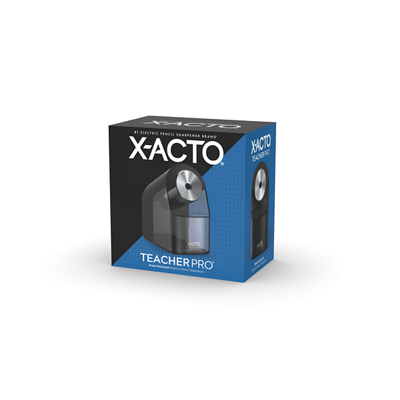
The X-ACTO Teacher Pro 1675X is listed on the manufacturer's product page as a black, one-count electric pencil sharpener with SKU SAP_1675X. Its classroom pitch is a combination of an auto-adjust pencil-size dial, a SmartStop cutoff, a completion LED and SafeStart bin protection. This is a document-based assessment of that exact edition, not a hands-on test. No sharpening time, sound level, point geometry, cutter life or classroom endurance has been measured here.
These claims address different parts of a shared routine: size adjustment, cycle cutoff, visible completion and bin removal. Do not treat a family name or shorter retail title as proof that a listing has the same version or package.
An auto-adjust claim is not a diameter chart
X-ACTO says the auto-adjust dial works with all pencil sizes. That is a broad fit claim, not a published opening range. The product page gives no minimum or maximum diameter, no mapping for triangular or oval shafts, and no model-specific chart for jumbo pencils. The manufacturer also calls the sharpener compatible with colored pencils, but that does not establish an exact fit for every colored-pencil format.
If you rely on a particular pencil, measure its widest shaft point and check with the exact model before buying. A moving or self-adjusting inlet can be a useful design distinction from the School Pro 1670XT's six-position dial, but it cannot tell you from the available evidence whether a 9 mm, hexagonal or specialty pencil will pass through correctly. The finder therefore leaves numerical diameter unknown for this model. It will not turn the phrase “all pencil sizes” into an invented measurement.
SmartStop and the LED do not promise a chosen point style
The Teacher Pro's SmartStop feature is described as switching off the motor when a pencil reaches X-ACTO's “ideal sharpness.” A bold LED is said to tell students when sharpening is complete. Those are two related but separate claims: one describes the cutoff, the other provides a visible signal. They may help a teacher notice that a student's turn has ended, but the documentation does not give a numerical tip length or say that the machine can select a short, blunt, or long point for shading.
Do not read “break-resistant” as a guarantee against every broken core. The page positions the precise tip and automatic stop as ways to reduce lead breakage and distraction; it reports no measured rate or test protocol. The light signals the machine's completion state, not tip quality for a particular drawing task.
SafeStart is a separate bin-removal safeguard
The product page says the SafeStart motor stops when the extra-large shavings bin is removed. That interlock is not the same feature as SmartStop: the first concerns the receptacle, and the second concerns the sharpening cycle. The manufacturer also describes the bin as easy to empty and the base as slip-resistant. These can be useful in a shared classroom station, although the page gives no bin volume or count of pencils per fill.
Keep the receptacle in place during ordinary operation, set the sharpener on a stable work surface and keep fingers away from the cutter opening. X-ACTO's general care advice says to unplug before emptying or cleaning. Follow the exact product instructions, rather than treating an automatic shutoff as permission to reach inside the mechanism.
Colored-pencil support has a soft-core caveat
The exact Teacher Pro page lists colored-pencil compatibility and specifically discusses woodcase pencils. X-ACTO's broader troubleshooting guidance warns that crayons, chalk and soft or waxy pencils—including some colored pencils—can clog sharpener cutters. Read those statements together: the brand supports colored pencils generally but does not guarantee all core hardnesses, coatings or art media.
For standard graphite pencils or firmer colored pencils, the published support is relevant. If you mainly sharpen soft-core pastel pencils, wax-heavy colors, crayons or chalk, the available documentation does not establish this as a suitable choice. A classroom may have a mix of student supplies, so check which pencils will actually be used instead of assuming the compatibility statement covers every one.
Power details and service parts remain open questions
The page calls the Teacher Pro electric but does not specify its power arrangement in the captured description. It does not say whether this edition uses a wall cord, batteries or a rechargeable pack, or give voltage, cord length or adapter contents. If the sharpener must move between rooms or operate away from an outlet, verify the exact package and instructions first; this assessment does not classify it as corded or cordless.
The material reviewed here also does not state body dimensions, a sound rating, sharpening speed, warranty term or a replacement-cutter SKU for SAP_1675X. X-ACTO's help material contains model-specific service information for some older machines, but a repair procedure for another model is not a parts cross-reference for Teacher Pro. Ask for exact SKU compatibility before ordering any cutter or service part.
Who should investigate it—and what to verify
The Teacher Pro is worth investigating for a classroom or shared desk where automatic pencil-size adjustment, a visible completion cue, a point stop and a bin-removal interlock matter more than a documented diameter chart. Its LED and SmartStop distinguish it from the School Pro 1670XT's described flyaway-cutter stop; both pages separately describe SafeStart and a large or extra-large receptacle. This is a document comparison, not a side-by-side test.
Before choosing a seller, confirm the black Teacher Pro 1675X one-count edition and manufacturer SKU SAP_1675X, inspect the exact package and determine how it is powered. Test an actual representative pencil or obtain a precise size confirmation, especially for jumbo or shaped shafts. Check the seller's return terms and verify service-part fit if that matters to your school. The review does not claim current stock, price, buyer ratings or personal classroom experience.
Key specifications
Key details at a glance
| Manufacturer SKU | SAP_1675X |
|---|---|
| Pencil-size control | Auto-adjust dial |
| Point-stop feature | SmartStop motor cutoff |
| Completion indicator | LED completion light |
| Documented pencil media | Woodcase graphite / Colored pencils |
| Stops at a sharpening point | Yes |
| Shavings-bin safety interlock | Yes |
| Shavings bin | Extra-large (manufacturer description) |
Use the exact model’s instructions for operating limits, supplied equipment and version differences.
Sources for this review
Sources for this assessment
Check your own needs against the model
Use the finder to apply the documented limits, then verify the exact model and package before choosing a seller.